theonlyD800inthehameau
Photography by theonlydeadheadinthehameau
Before & After: Boat
Posted on December 18, 2015
My little exercise in post-processing this week was actually inspired by the December One Photo Focus, which was published last Friday. My own humble effort can be found here, but I was particularly interested by some of the other participants’ use of the more sophisticated and creative tools available in Photoshop. Apart from anything else, it made me more determined than ever to try to get to grips properly with this extraordinarily sophisticated (downright clever) program.
Original image

This photograph was taken at the famous lily pond in Claude Monet’s garden at Giverny, in Normandy. The day was very overcast and drizzly, so the light was very flat, the water looks very drab and even the reflections are rather dull. The whole thing obviously needs some work.
Lightroom

Some basic editing in Lightroom helped to cheer up the image. Cropping made the boat the centre of attention and some work with the sliders brought out more detail. Increasing the Green Saturation helped to overcome the overall flatness, and moving up the Clarity and Vibrance gave the image more punch. Without being anything special, it’s a lot better than it was.
Photoshop
Then it occurred to me that, since the picture was taken in a painter’s garden, why not make it look more like a painting? And since Monet was, of course, an Impressionist, why not try to give it something of an impressionist feel?
So I used the Paint Daub effect in Photoshop and came up with the image below. I could have made the effect more extreme, but – if I’m honest – chickened out. Anyway, it’s far removed from the original image and, I think, a lot more interesting.

Before & After: Cradle
Posted on December 11, 2015
This photograph was taken in less than ideal conditions: in a local stately home during an Open Day, as I shuffled – along with many other people – past the open doorway of a nursery. With no time to frame a shot, or to do much more than simply record what was on view, it would obviously be necessary to make the best of whatever I was able to get at a later stage.
Original Image

Apart from the clutter, the key challenge was obviously to deal with the very strong backlight from the sun streaming through the uncurtained window.
Edited Version
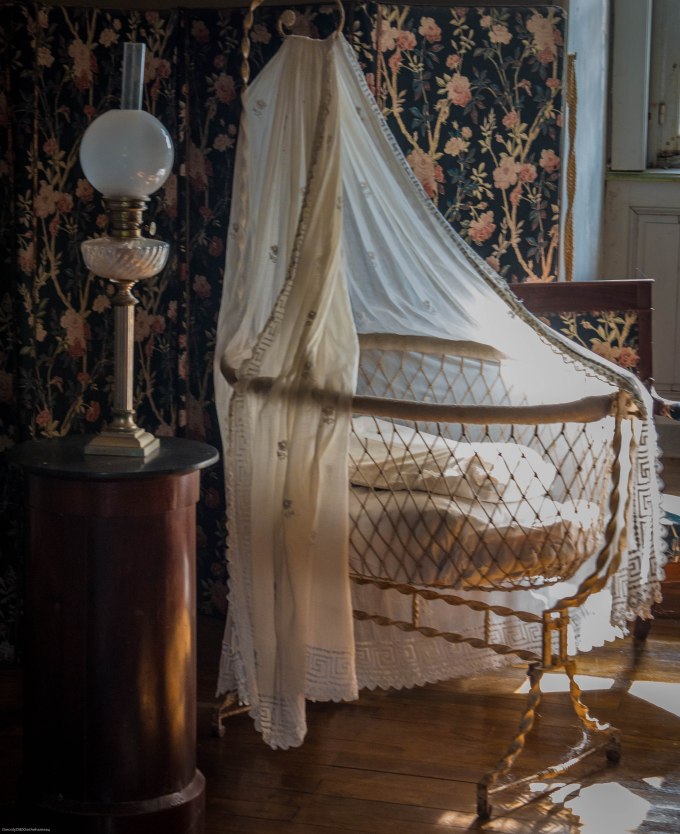
The focal point is clearly the cradle, so the crop was pretty obvious. The lamp on the table gives a sense of scale and also balance and there wasn’t much that could be done about the window apart from cut out as much as possible.
The cradle is interesting in itself, not only for its antiquity but also the intricate metalwork and the delicate lace, the details of which are ‘blown out’ in the original by the sunlight. I offset this to the best of my ability by:
- Taking down both ‘Highlights’ and ‘Whites’ to -100 brought much of this back
- Boosting ‘Clarity’ to +55 brought back some more of the lost detail, while ramping up both ‘Vibrance’ and ‘Saturation’, gave a more solid feel to the bed-linen and the metalwork.
- I boosted both the Saturation and Luminance of the individual Yellow slider, which also helped to offset the ‘blinding’ effect of the sunlight.
One Photo Focus: December 2015
Posted on December 4, 2015
My second contribution to the After-Before Friday Forum coincides with the monthly One Photo Focus. This requires all participants to edit the same image, which in this case has been provided by Julie Powell at Julie Powell Photography. Here is the original:

…and here is my edited version:

Herewith my rationale for the changes I made:
- Cropped for balance, to put the flower itself at the centre of the picture
- Darkened the background, to remove as much as possible that could distract from the subject. I also finished this off with a Lightroom pre-set Light Vignette
- Adjusted the tone curve to soften the white in the petals (Clarity -24) and also bring out detail in the water drops on the right-hand side (Vibrance +30)
- Most radically, I changed the colour at the centre of the image as the original yellow seemed to me to be rather ‘washed-out’. I simply took down the Yellow Hue adjuster to -100, which produced this – I think – more attractive salmon-pink tone
- Cloned over the green ‘blob’ just to the left of centre in the flower, which was another distraction
Before & After: Oryx
Posted on November 27, 2015
For me, post-processing is equally as important as capturing the image in the first place, and some judicious editing can elevate a mundane photo into something that’s of greater aesthetic appeal and so, hopefully, of at least passing interest.
I’ve decided to begin participating in the weekly After Before Forum, hosted by Aperture64. This entails posting two versions of the same photograph: the ‘before‘, as shot, and the ‘after‘, once that original has been edited. Here’s my first contribution.
The Original Image

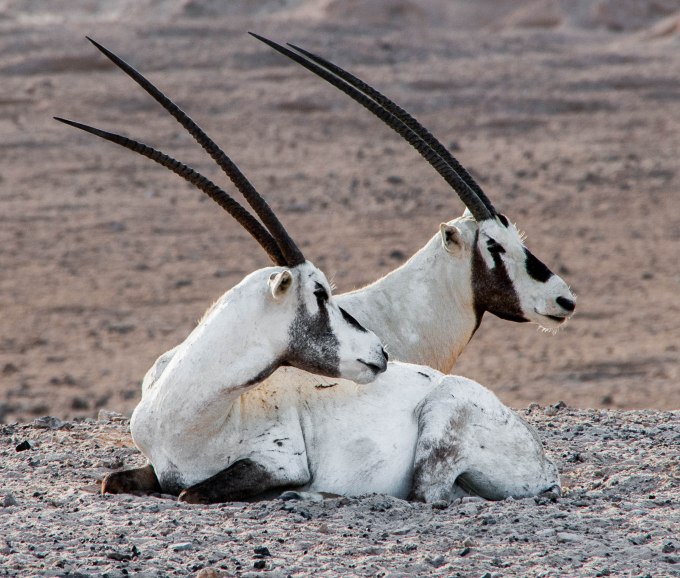
This was taken on the Sir Bani Yas Island nature reserve in the United Arab Emirates and is of a pair of Arabian oryx, a previously endangered species that now roams freely on Sir Bani Yas, thanks to some major conservation efforts. What lifts this particular shot out of the ordinary, for me, is the matching ‘pose’ of the two animals.
The Editing
For editing I principally use Lightroom. I have a Creative Cloud subscription, which also gives me access to Photoshop, although I use this comparatively rarely (I keep telling myself that one day I’ll get to grips properly with Photoshop, but it hasn’t happened yet).
I always begin the editing process with some straightening, when necessary. This eliminates what can be an irritating distraction (especially in landscapes and – even more so – seascapes). This particular image has been very slightly levelled out.
After this comes cropping. The purpose of cropping is to remove, as much as possible, anything that detracts from the actual subject of the photograph. There was a case for leaving the oryx in a more expansive landscape, but having taken the view that the pose was the real subject, I decided on a closer crop with clear focus on the animals themselves.
Only when you’re happy with the composition of the image is there much point, in my view, in trying to get it to look as good as possible.
The enhancement of the image is very largely a process of trial and error. The camera’s own settings – other than in special circumstances I use Aperture-Priority mode – almost always deliver a correct exposure, so it’s really a matter of working through the Menu items in Lightroom’s Development mode.
Of these the first is the most important, so I spend the most time on playing around with the various Tone sliders – Highlights, Shadows, Whites and Blacks – while keeping one eye on the histogram and the other on the image itself (no mean trick if, like me, you’re basically one-eyed). It’s fascinating to see how much more detail can be coaxed out of a RAW file (I always shoot in RAW) with these adjustments.
Occasionally, this process throws up some jarring colour casts, which I’ll correct using the individual ‘Color’ sliders. As it happens, there was an odd blue tinge to the white fur, which I eliminated by taking down the Blue saturation. Since there’s no real blue in the image – none that ought to be there, at any rate – this doesn’t detract from anything else.
Once I’m happy with the result of all this, I move on to the Presence part of the Menu (Clarity, Vibrance and Saturation). To be perfectly honest, I find that the ‘Punch’ preset in Lightroom does a pretty good job. That’s +30 on Clarity and +25 on Vibrance. Of course, it can be tweaked further from there.
Likewise, since I’m not sure I really understand Sharpening, I tend to defer to Lightroom’s ‘Sharpen’ pre-sets. Finally, I might experiment with the Noise Reduction sliders, but noise isn’t usually a problem in even halfway decent light conditions. I think it’s important to remember that even though you have a lot of adjustment tools at your disposal, you don’t have to use them all, just for the sake of it.
The Final Image

Top Posts & Pages


 theonlyD800inthehameau